Connect the unfamiliar to what you know
Marcus explains how analogies and project stories give learners reference points they can recognize and use in their own work.
Read Marcus’s original post
The BPV 360 approach
BPV 360 is how I organize your training: understand the system, practice the task and explain the result. We connect commissioning, quality, controls, integration, energy and operations so people understand how their decisions affect the next person.
The BPV method
Start with the person and a task that matters. Train, test, verify and perform. Then revisit the lesson as the work changes. Open a step to see what happens and what you work toward.
We begin with your role, the task you need to perform and what you can already explain or demonstrate. A beginner may need the language and the system map. An experienced professional may need to uncover a missed foundation or prepare for a different responsibility.
What you work toward: a specific learning goal, a starting point and clear criteria for the task.
We connect an unfamiliar idea to something you know, explain the reason behind it and show the task. Then you practice with guidance before trying it with less support. Drawings, stories, discussion and demonstration give you different ways into the same lesson.
EDGE: Explain, Demonstrate, Guide, Enable. This teaching sequence comes from Scouting. BPV applies it within technical learning, alongside project context, feedback and evidence.
Read The Trainer’s EDGE, Boy Scouts of America (PDF)
What you work toward: understanding you can explain and a task you have practiced.
You work through a new question, document or practical scenario without simply copying the demonstration. The difficulty and support match the learning goal. Your reasoning shows where the lesson has connected and where another explanation or attempt would help.
What you work toward: your own work, your explanation and an honest account of any help you needed.
A trainer or mentor reviews the evidence with you: what you did, why you did it and how the result meets the task requirements. If something is missing, we identify the gap, give specific feedback and return to practice.
What you work toward: a clear view of what you demonstrated, what needs more work and your next step. A course attendance record alone does not establish capability.
Apply the skill to an agreed task in a realistic exercise or appropriate project setting. Connect your decision to the people, systems and outcome it affects. Project work follows approved procedures, qualified supervision and your authorized role.
What you work toward: useful work that another person can follow, with the context and limits made clear.
Return to the skill in a different situation. Explain what still applies, what has changed and what you need to check again. Teaching the reasoning to a colleague can reveal gaps and help carry the lesson into the team.
What you work toward: a skill you can adapt, a lesson you can share and a new goal as your responsibility grows.
What makes this BPV
Marcus brings lessons from commissioning, controls, integration, energy, construction and teaching into one learning approach. These are the habits you practice along the way.
We build from what you already know, whether you are entering the industry, changing careers or deepening an established specialty.
Trace what your task depends on, what depends on it and who owns the next step. Then explore the depth your role needs.
A story introduces the lesson. An analogy helps it make sense. A task lets you apply it and test where the comparison stops being useful.
Learn the reason behind the process and find the documents that support the decision. Revisit the basics when experience has left gaps.
Questions, observation and specific feedback help reveal understanding. You get another attempt to address what you missed.
Practice explaining a finding, asking a useful question and recognizing when another discipline needs to be involved. Carry the lesson into the next situation.
Try the thinking
Follow a small learning exercise from the goal through feedback and transfer. Use the supplied information; this example does not ask you to operate equipment.
Your objective: distinguish a command from feedback, explain what the evidence supports and identify the next question.
In this training scenario, cooling depends on water flowing through the equipment. The instructor traces a simple path: control command → pump response → water flow → cooling at the equipment.
Guided example: the run command is ON, motor status is OFF and no flow reading is supplied. The instructor explains why a command tells you what was requested. It does not, by itself, show what happened. You identify the missing evidence together.
You now have a different set of training data:
Which statement can you support? Choose a response to explore the feedback.
The status gives you one piece of feedback. It does not establish water flow or cooling at the equipment. Trace the remaining connections and identify the evidence needed for each.
That conclusion goes beyond the data. The readings raise a question, but they do not establish the cause. Review the meaning and reliability of each point before deciding what failed.
This conclusion fits the evidence. Explain the difference between command, status and flow, note that the flow reading still needs validation, and identify the missing cooling evidence. An unanswered question is a useful finding when you can explain it.
These responses illustrate reasoning. Opening an answer is not an assessment of practical competence.
In a coached exercise, you would explain your answer and submit a short finding. A trainer reviews it against the agreed criteria:
The review identifies what you demonstrated, what needs more practice and where evidence is still missing. A correct selection alone is not the complete task.
Example feedback: “You recognized that the command is not proof of cooling. Now explain why the flow reading needs checking and identify the evidence you would request.”
You revise the finding, then try a new scenario. For example, a fan shows a run command and motor status, but the room still receives no measured airflow. Explain what transfers from the pump example and what is different.
The lesson you carry forward: trace the requested action, the observed response and the required outcome. Support each conclusion with evidence and know when to ask for help.
The thinking behind the method
Explore the project lessons and teaching ideas behind this approach.
Marcus explains how analogies and project stories give learners reference points they can recognize and use in their own work.
Read Marcus’s original postStart with power, cooling, controls and their dependencies. Then give each role the technical depth it needs.
Read Marcus’s original postRevisit the fundamentals, compare understanding and ask for evidence. Experience can contain gaps worth closing.
Read Marcus’s original postOne approach, three views
The person at the center shows how you engage with a lesson. Competency builds in cycles shows how you revisit it as responsibility grows. The experience-transfer method shows how a project lesson becomes something another person can use.
Explore the interactive graphicsProgress you can build on
“Inch by inch, life is a cinch.
Mile by mile, life is a trial.”
My mother told me this growing up. It has stayed with me, and it captures how I want to help you learn.
Marcus Myers · Founder, BPV Academy
Practice with BPV Academy CoachYou will not become an expert overnight. A class can give you a foundation, useful questions and a place to begin. Expertise grows through practice, feedback and experience over time.
Start with one idea. Explain it in your own words. Try it in a different example. Find the gap, then work on that next. You may connect with something immediately or need to revisit it over several weeks. Both are reasonable starting points.
We look for evidence of progress: what you can explain, what you can apply and where you still need support.
Take one useful step
Choose a question. You can use these prompts on your own, with a mentor or with your team.
Pick one term from your work. Explain it without notes, using an example you already understand. Compare your explanation with a reliable source. What did you leave out?
Practice making connectionsTry a different example before looking at the answer. Explain your decision and the evidence behind it. A familiar answer is a starting point; applying the idea elsewhere gives you another useful check.
Work through an exampleBring your attempt, the point where you got stuck and the sources you checked. That gives a mentor something specific to work through with you.
Bring your question to MarcusReturn to the important ideas, retrieve them without notes and use them in new examples. Check the reasoning and correct mistakes. Then revisit the work after some time has passed. A packed agenda cannot tell us what you will still understand and apply later.
The amount and timing of practice depend on your starting knowledge, the task and your opportunities to use it. We agree a manageable learning plan rather than promise everyone the same finish date.
We begin with what you already know and what you need to do. If an explanation does not connect, we try a different example, work through a smaller step or revisit a prerequisite. Questions help us adjust the teaching.
A regular, realistic practice habit is more useful than a promise to study every night that you cannot keep. For company programs, managers also need to protect time for practice and feedback.
Keep the questions, worked examples and checklists close to the task. Use them to explain your reasoning, challenge assumptions and decide what still needs evidence. Record the question you cannot resolve so your next discussion is focused.
You can also use our written AI practice prompt to rehearse questions in a separate AI tool. Check its technical claims against authoritative sources and applicable project requirements. It does not replace instructor review or project authorization.
Try the lesson and its AI practice promptBefore you commit, we agree the preparation, instruction, practice, assessment and follow-up included in your program. That includes the coaching sessions or review opportunities, their timing and the period of support.
You bring your effort and questions. BPV provides the agreed teaching, feedback and next steps. Your company helps create opportunities to practice. The aim is growing independence with a clear way to ask for help.
Plan the learning and follow-upThe learning design draws on research about spaced review, recalling information, worked examples and explanatory questions. Read the Institute of Education Sciences practice guide
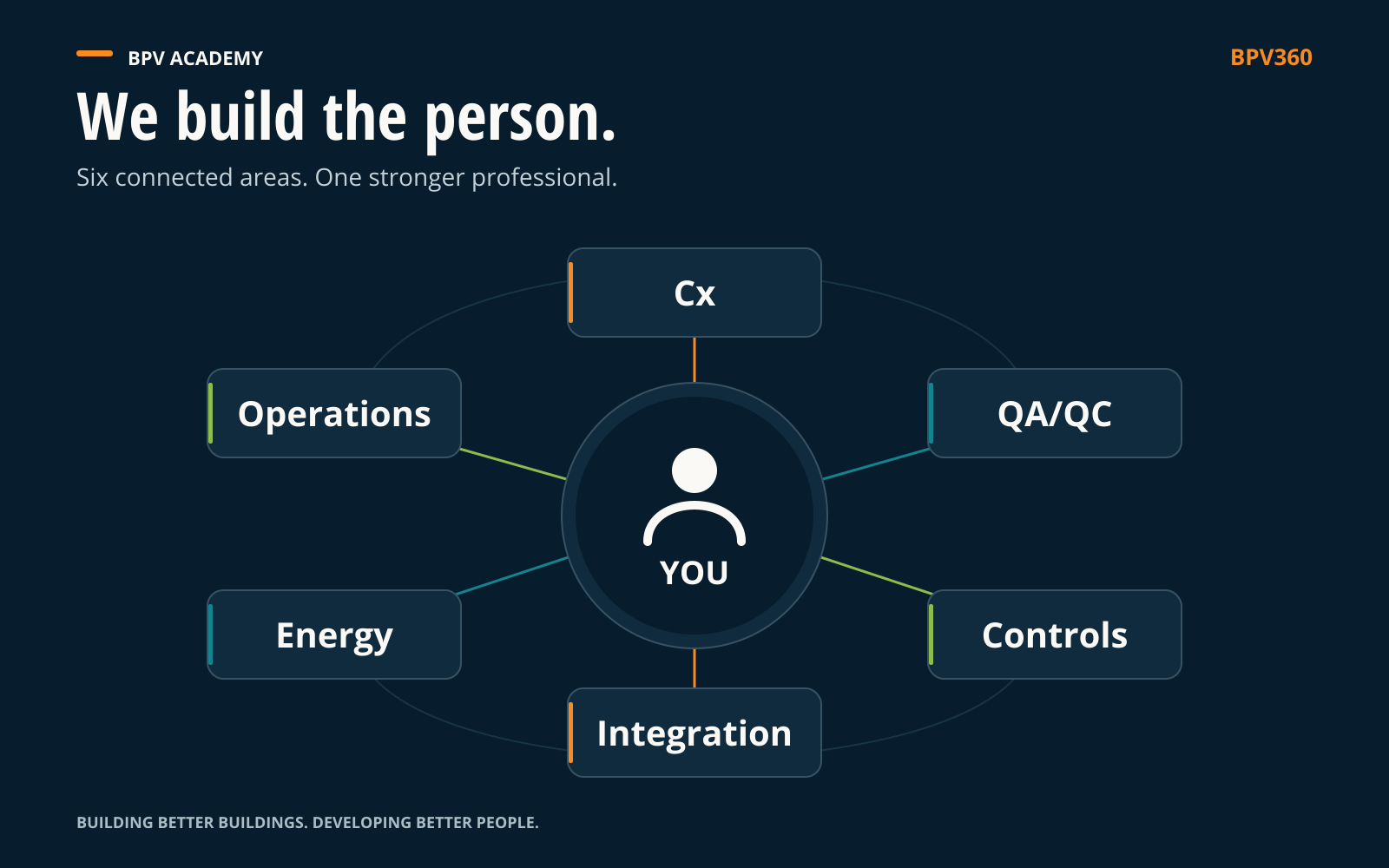
Select a subject to explore its connection.
Your choice updates the lesson. The guided tour changes subjects every seven seconds.
Explore a connected fundamental
Follow one example around the circle
A plausible number on a screen is only one part of the story. Select a connection to see what the team needs to understand.
Open a topic to explore the work.
What does the owner need to understand or improve? Define the measurement boundary, operating purpose and acceptance evidence.
Owner requirements → QA/QC planning and the integration scope.
Review installation and instrument records. Confirm the meter source, equipment relationship and approved electrical verification evidence with the responsible specialists.
Installed equipment → a traceable, verified measurement.
Follow the value, scaling, units, update behavior and alarms. Compare the physical condition with what the controller reports.
Field measurement → control logic and a meaningful response.
Define who provides, maps and validates the point. Verify names, units, timestamps, quality and behavior if the connection fails.
Building automation, electrical monitoring and supervisory controls → usable information across systems.
Compare reliable readings with loads, schedules and the operating baseline. Investigate a pattern before recommending an adjustment.
Trusted operating data → an informed performance decision.
Confirm the result against current facility needs. Update operating records and training, then feed the lesson into the next review.
Operating evidence → renewed requirements, quality checks and capability.
Close the circle. Operating evidence informs the next requirement, quality check, control adjustment and training need. The people and the building keep developing together.
Division 25 · Master systems integration
Who owns the interface? Which value is correct? What should happen when communication fails? Marcus works through these questions as a practicing integrator and brings them into the learning.
Vendor agnostic. Follow the purpose, the interface and the evidence across manufacturers and platforms.
Talk through your integration needsThe reasoning behind the answer
Questions reveal what someone understands and where they need more support. The next question becomes more demanding as capability develops.
Identify the system, the requirement and the equipment involved.
Follow the sequence, the interface and the expected behavior.
Connect the work to its operating purpose and what happens if it goes wrong.
Predict the response and identify the evidence needed to support the answer.
Learn through connections
Start with something familiar. Predict what happens next. Follow the connection into commissioning, controls, people and data.
Try the interactive lessonsA habit you can use today
Choose a drawing, finding or system you are learning. Work through the questions, then explain the result to someone who will use it next.
What should happen, and which requirement or task are you trying to understand?
How do the equipment, controls, information and people make that result possible?
Why does it work this way? Explain the reason, rather than repeating the instruction.
What changes if a condition, input or dependency is different? What would you check?
Who needs your result, what do they need to know, and who owns the next decision?
Adapted from Marcus’s writing on learning the whole project. These questions support reasoning; the requirements for each task still need to be established.
The 100–500 pathway
A person can be advanced in one subject and developing in another. Progress follows the task, the context and the evidence.
A real question to work through
One condition. Five levels of responsibility. Select a level to see the task and the evidence.
Illustrative learning scenario. Field activity follows approved procedures, qualified supervision and the learner’s authorized scope.Open a topic to explore the work.
Explain how a command to run, reported equipment status and actual air or water flow can differ. Identify the information you need before drawing a conclusion.
Evidence of capability: A labeled map of the equipment and its control signals, with a clear question to investigate.
Compare source readings with recorded trends, with coaching. Record where the observations agree and where they differ.
Evidence of capability: A reviewed record of observations and any differences.
Carry out the agreed verification task within your role. Check the evidence and bring unresolved issues to the person responsible.
Evidence of capability: A finding supported by evidence and a recommended next action.
Coordinate an investigation with controls specialists, mechanical specialists and operators. Clarify who does what and what evidence will show the issue is resolved.
Evidence of capability: A resolution plan with clear responsibilities and evidence of completion.
Decide whether the same issue may affect other systems or sites. Improve the process and help others apply the lesson.
Evidence of capability: A reviewed process update, a teaching plan and a check that the change worked.
BPV learning levels describe development within a subject. A project’s Cx stages describe the project work and follow the owner’s terminology and criteria. Compare BPV learning levels, project stages, energy-audit levels and rating frameworks
The framework in detail
Choose a model, then click or tap a part to see what it means, how to practice it and what progress looks like. Open the original graphic for a closer look.
Different ways of learning help you understand commissioning (Cx), quality, controls, integration, energy and operations. Choose a part of the inner learning circle.
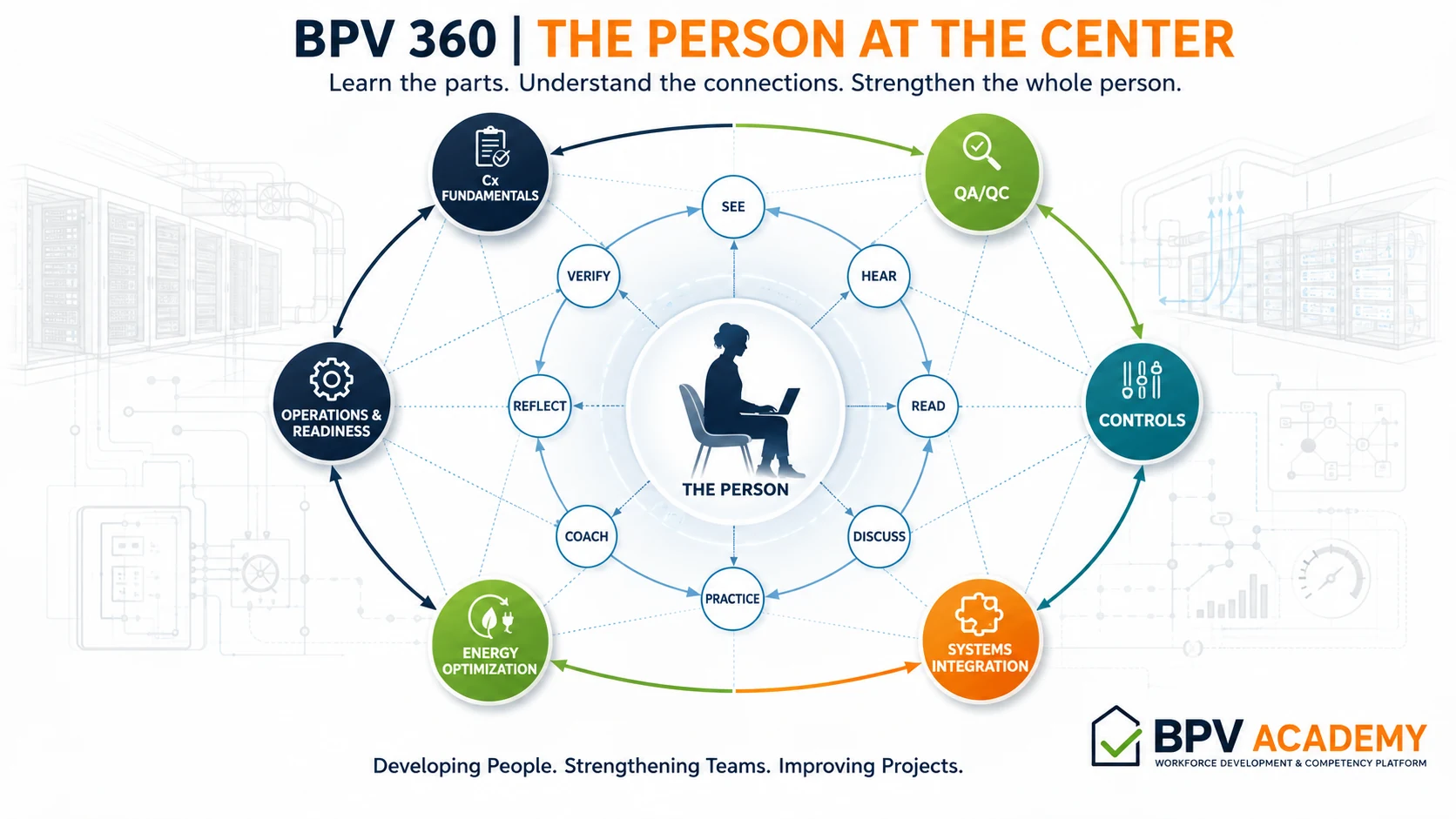
Choose a part on the graphic or below
PART 01 / 08
Make the work visible.
Think it through
A room feels warm, but the screen looks normal. What would you look at first?
Locate the room, the displayed temperature reading and the equipment serving it. Confirm that the screen is showing information for that room before drawing a conclusion.
PART 02 / 08
Listen for the reasoning behind the action.
Think it through
An experienced operator says, “It always does that.” What would you ask?
Ask what they observe, when it happens and why they think it happens. Their experience is a starting point for investigation, not proof by itself.
PART 03 / 08
Find what the work is supposed to achieve.
Think it through
The display says “normal.” Where would you find what normal should mean?
Find the approved sequence of operations, which describes how the system should respond, and the relevant project requirements. A label on a screen does not explain the required behavior.
PART 04 / 08
Test your understanding through questions.
Think it through
One person suspects the sensor; another suspects the air supply. How do you move the discussion forward?
Ask what evidence would support each explanation. Agree on what needs to be checked instead of choosing the most confident voice.
PART 05 / 08
Turn an explanation into a repeatable skill.
Think it through
Before working on the live system, how could you practice the investigation?
Use a provided drawing and sample trend data: readings recorded over time. Explain the order of your checks and get feedback on the reasoning.
PART 06 / 08
Use feedback to close a specific gap.
Think it through
Your first explanation misses a system connection. What should coaching change?
Identify the missed connection, trace its effect and try the explanation again. Feedback should lead to a specific improvement.
PART 07 / 08
Notice what changed your thinking.
Think it through
The sensor was reading a different location. What is the lesson?
Confirm what each data point represents before relying on its value. Explain where else that habit will matter.
PART 08 / 08
Check understanding against evidence.
Think it through
You have a plausible explanation. Is that enough?
Show the observations and requirements that support it, and identify anything still uncertain. Plausibility alone does not verify a result.
Revisit a topic in new situations as your responsibility grows. These seven stages take you from understanding the basics to practicing with guidance, demonstrating the skill and helping someone else learn.
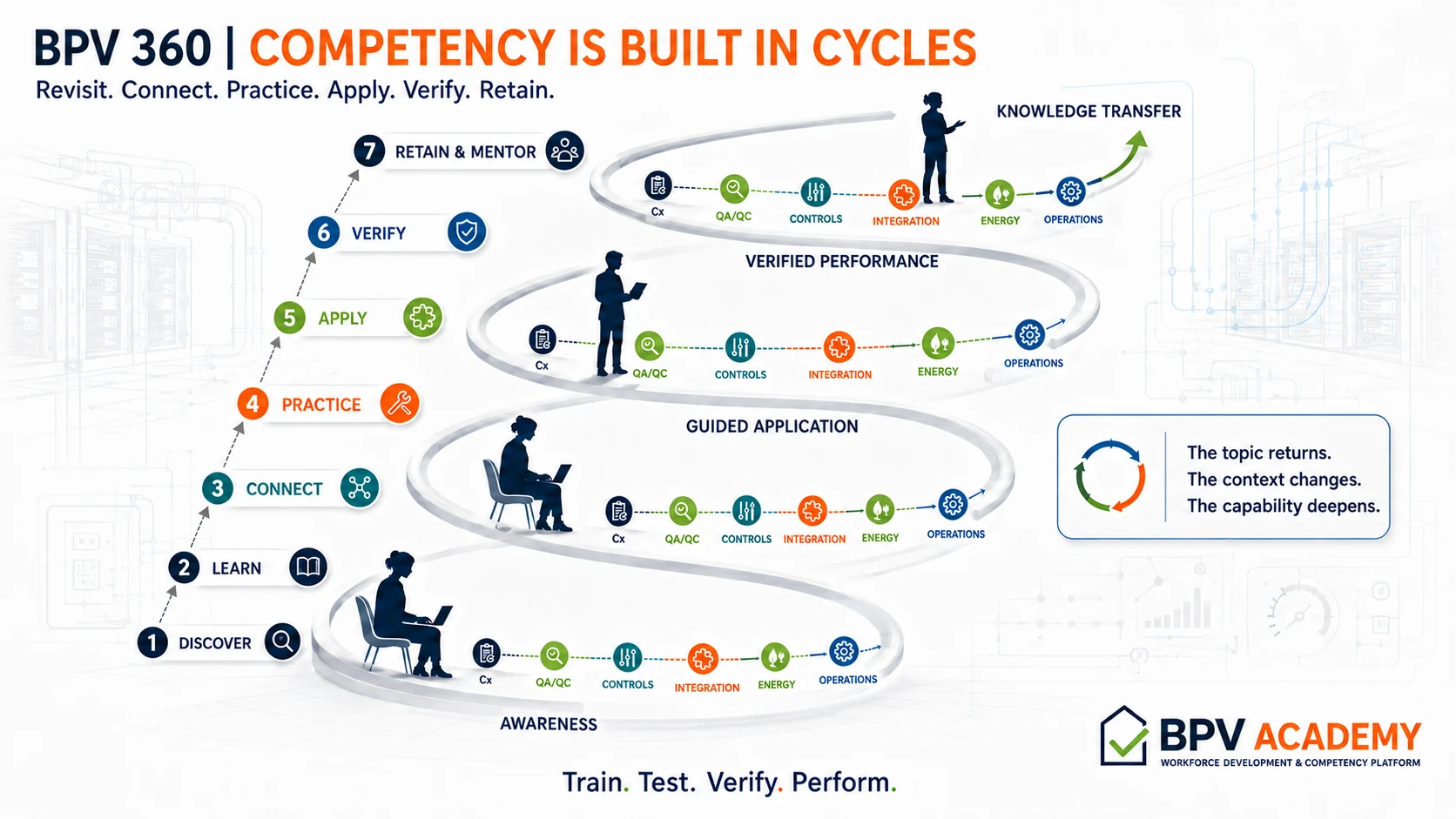
Choose a part on the graphic or below
PART 01 / 07
Find the starting point.
Think it through
You have been asked to help investigate a temperature complaint. Where do you start learning?
Clarify the task and your role. Identify what you understand about the system and where you need support.
PART 02 / 07
Build the foundation.
Think it through
Which basics help before you interpret temperature readings recorded over time?
Understand what the sensor measures, where it is located and how its reading relates to the intended system operation.
PART 03 / 07
See how the parts affect each other.
Think it through
Why might a sensor show a normal reading while the room feels uncomfortable?
The reading may not represent that room or the full operating conditions. Follow what was measured, how the controls responded and what happened in the room.
PART 04 / 07
Try the task with support.
Think it through
How can you rehearse before making project decisions?
Work through sample drawings and data with a coach. Explain the checks you would make without changing live equipment.
PART 05 / 07
Use the skill in the right context.
Think it through
You are ready to help on a project. What guides your work?
Agree on the task, approved procedure, supervision and your authorized role before starting.
PART 06 / 07
Demonstrate the capability.
Think it through
How would someone else know you can perform this task?
They should be able to follow your work, your reasoning and the evidence against the agreed criteria.
PART 07 / 07
Keep the skill useful and help someone else learn.
Think it through
A colleague faces a similar complaint on a different system. What do you pass on?
Teach the investigation method and its limits. Help them check the new context rather than reuse the old conclusion.
A project story becomes useful when someone can understand the principle, practice the thinking and carry the lesson into their own work.
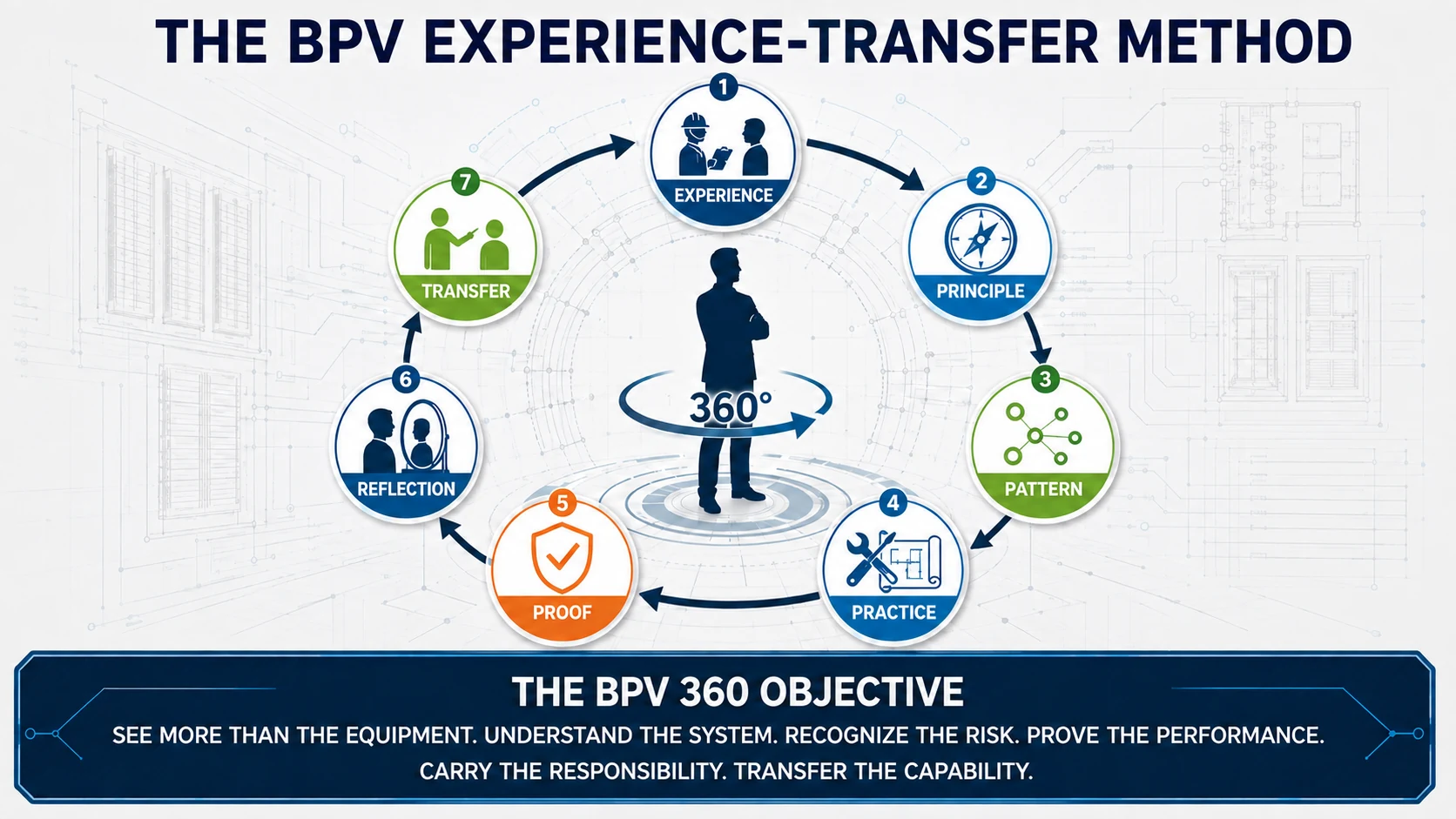
Choose a part on the graphic or below
PART 01 / 07
Start with something that happened.
Think it through
A project lesson starts with “the controls were wrong.” What information is missing?
Describe the system, the expected response, the observed response and the conditions. A useful lesson starts with a specific situation.
PART 02 / 07
Explain the lesson underneath the story.
Think it through
A data point was linked to the wrong piece of equipment. What principle carries forward?
Confirm that the data represents the intended equipment before using it to make a decision.
PART 03 / 07
Recognize where that lesson might apply again.
Think it through
Does that same lesson apply to a meter or an alarm?
It can. Confirm the source and meaning of the data, while checking what is different about the new application.
PART 04 / 07
Give the learner a decision to work through.
Think it through
How would you turn that story into a training exercise?
Provide a drawing and a short list of control signals or readings, with one linked to the wrong equipment. Ask the learner to find the mismatch and explain how they checked it.
PART 05 / 07
Look for evidence that supports the result.
Think it through
The learner identifies the mismatch. What would make the answer convincing?
They can trace the point to its intended equipment and show which information supports the conclusion.
PART 06 / 07
Improve the next decision.
Think it through
The mismatch was missed during the first review. What should change?
Examine why the review missed it and add a specific check that addresses that gap.
PART 07 / 07
Make the lesson usable by someone else.
Think it through
How do you know someone can use the lesson in their own work?
Give them a different example. Ask them to explain and apply the reasoning without simply repeating your answer.
These are learning examples. Project requirements, approved procedures and your authorized role govern the work.
Your people. Your priorities.
Bring the role, the project and the challenge. We will build the learning around them.
Help shape BPV
Tell us what connected, where you got stuck or what is missing for your role. Your questions help identify the next lesson to develop.
You can review and send your feedback in your email app.